

Websites for plumbing companies

Plumbing websites built for urgent calls and planned work.

Give a repair customer a clear way to act. Give a project customer enough detail to request an estimate. WCAP builds the website around the work you offer and the way your team handles it.

  • Mobile contact
  • Real service areas
  • Verified proof

The Two-Speed Plumbing Website

Both visitors need clarity. They need different amounts of detail before the next action makes sense.

Help me decide what to do now

Urgent repair path

Illustration: water is leaking and the customer needs help.

  • Do you handle this plumbing issue?
  • Do you serve my address?
  • What availability can you truthfully offer?
  • What real evidence helps me trust you?

Action fit: A clear call path when coverage supports it; otherwise an honest request path and response expectation.
Help me understand the job

Planned work path

Illustration: the customer is considering a water-heater replacement, where offered.

  • What work and options do you offer?
  • What changes the scope or estimate?
  • Can I see relevant completed work?
  • What happens after I request an estimate?

Action fit: An estimate or consultation request that lets the business review the project before confirming scope.

A blocked drain should not require a project proposal. A planned installation should not require a rushed call before the customer understands the work.

The First-Screen Contract

The first useful mobile view should answer five questions. This is a content check, not a rigid hero template.

  1. What

    State the plumbing services the business actually offers.

    What to verify

    A drain-clearing customer should not have to infer service fit from a vague promise to handle everything.

  2. Where

    Show the real area served before the customer starts a request.

    What to verify

    Use accurate coverage and any relevant travel limits. A long list of cities is not a substitute for a workable service area.

  3. Availability

    Explain the actual contact and response arrangement.

    What to verify

    24/7, same-day and emergency response belong here only when the company verifies it can deliver them.

  4. Trust

    Place a verified reason to trust the company near the decision.

    What to verify

    Use real work, approved reviews and verified credentials. Do not invent insurance, licenses, warranties or years in business.

  5. Action

    Make the next step clear and usable on a phone.

    What to verify

    Call, request an estimate or request a booking. Say what the action does rather than implying an unconfirmed appointment.

BrightLocal’s 2026 research found that 73% of respondents started their most recent local-business search on mobile. The panel comprised 1,227 U.S. consumers who had searched locally in the previous three months; it was not plumbing-specific.

Read the device research →

Call, estimate or booking: let the work decide.

A more elaborate contact system is useful only if the office and scheduling process can support it.

Call

Urgency or a conversation makes a quick fit check useful.

Phone coverage and escalation must match the hours and service claims shown on the site.

Make the real number easy to use; explain the alternative when the team is unavailable.

Request an estimate

Diagnosis, materials, access or project detail changes the scope.

The office needs enough context to assess the work before quoting or scheduling.

Ask for the service, location, issue or project, and a reliable reply path. Add photos only when useful and supported.

Online booking

The service, duration and available capacity are predictable.

Customers must choose accurately and the business must be able to honour the slot.

Confirm only what the scheduling system can support. Label a booking request as a request.

A request received is not an appointment confirmed. The website should make that distinction clear.

A useful page map follows the plumbing offer.

Give important services room to explain the work. Build area content only when it answers something the rest of the site does not.

From problem to relevant page

A customer looking for drain help should reach drain information. A customer considering a replacement should find scope, options and estimate expectations for that service, where it is offered.

Neither needs dozens of town pages saying the same thing.

  1. Homepage

    Make repair versus project work, coverage and the next action visible. Route customers to the service they need.

  2. Meaningful service pages

    Give drain work, water-heater work or other core services their own space when the company offers them and customer questions justify it.

  3. Service-area information

    Explain actual coverage. Add a location page only with useful local details beyond a replacement town name.

  4. Company and work proof

    Show approved team information, genuine reviews and relevant completed work. Keep credentials and warranties exact.

  5. Contact / estimate path

    Keep the action usable on mobile, gather useful context and explain receipt, review and confirmation.

The page has to work after the button is pressed.

A clear front end needs a reliable receiving process.

On a phone
Readable service information, large contact targets and quick pages. Keep heavy media away from the path to contact, and test the actual mobile layout.
After a request
Show receipt, deliver useful details to the right person and explain the next step. Keep recovery clear if the form fails; never silently lose the request.
In measurement
Track meaningful completed requests and supported call outcomes. Phone taps and form starts remain intent signals, not booked plumbing work.
Over time
Keep hours, areas, services and availability accurate. Retire old claims when the operation changes; upkeep matters as much as launch polish.

In BrightLocal’s 2026 survey of 1,002 U.S. adults, 54% said they check the business’s website after positive reviews. That supports treating the website as a place to verify the business, not just a way to discover it. Review research →

How WCAP builds around your operation.

The website scope starts with what your team can actually offer and handle.

Map the work you want

Confirm repair versus project services, residential or commercial fit, service coverage and how the office handles each request.

Write from verified information

WCAP handles agreed copy and design. You approve services, availability, credentials, warranties, photos and estimate expectations.

Build and connect

Create responsive pages, useful service hierarchy, technical SEO basics and the agreed call, estimate or booking experience. Test notifications and recovery.

Keep the information current

Assign updates for services, coverage, hours and staff processes. Optional Website Management can handle ongoing upkeep; larger integrations are separately scoped.

The Business Websites offer sets the standard scope and current pricing. Plumbing-specific needs shape the page plan; they do not create an invented package or a ranking guarantee.

Real customer-path work, clearly labelled.

WCAP Detailing · owned operator context

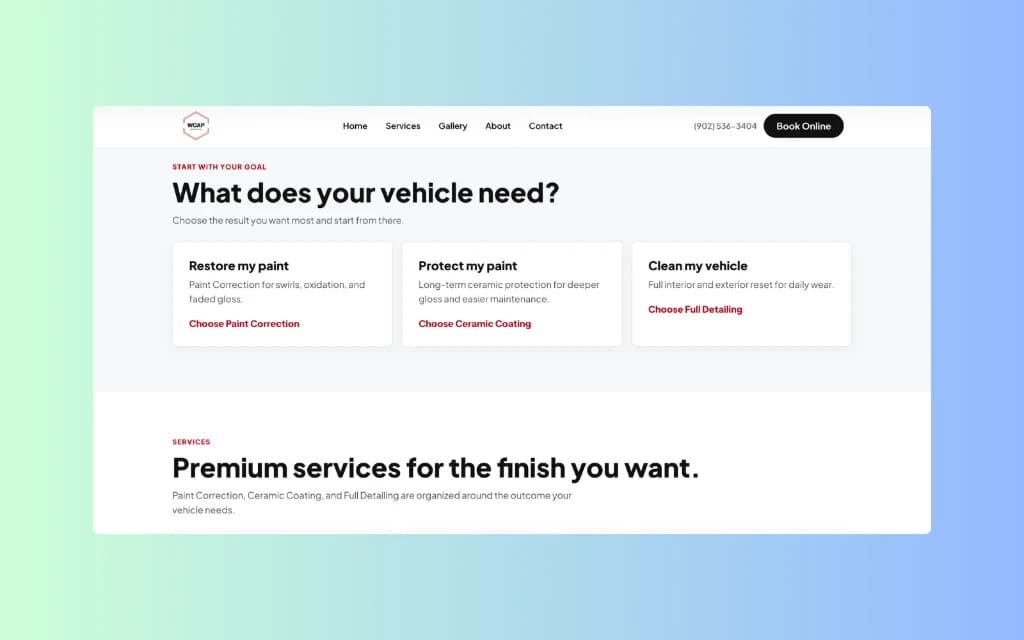
Inside WCAP Detailing, service selection, quote logic and booking requests connect to the way the business operates. That is relevant experience for building a contact path that staff can use. The plumbing services, capacity and intake rules still come from your company.

This is an owned detailing business. It demonstrates operator experience, not plumbing-client results. WCAP has no approved plumbing case study.

See the actual operator story →
WCAP Detailing service overview section with goal-based service cards for paint, protection, and cleaning.
The service structure helps visitors choose the right service before they book. This is the detailing booking experience, not a plumbing interface.

Questions about websites for plumbers

See where your plumbing website makes contact harder.

We will check mobile clarity, service coverage, proof and the path from a plumbing problem to a useful call or estimate request.

Free preview. No obligation. No required monthly plan.

Prefer to talk first? Call +1 (902) 706-8171 or send a text.